 OnClip
The clipboard that keeps your secrets.
Clipboard history for your Mac that catches every key, token and password you copy, locks it away, and hands it back with Touch ID.
Coming soon for Mac · Free · Pro $9.99 once · 7-day free trial · macOS 14 or later
Remembers
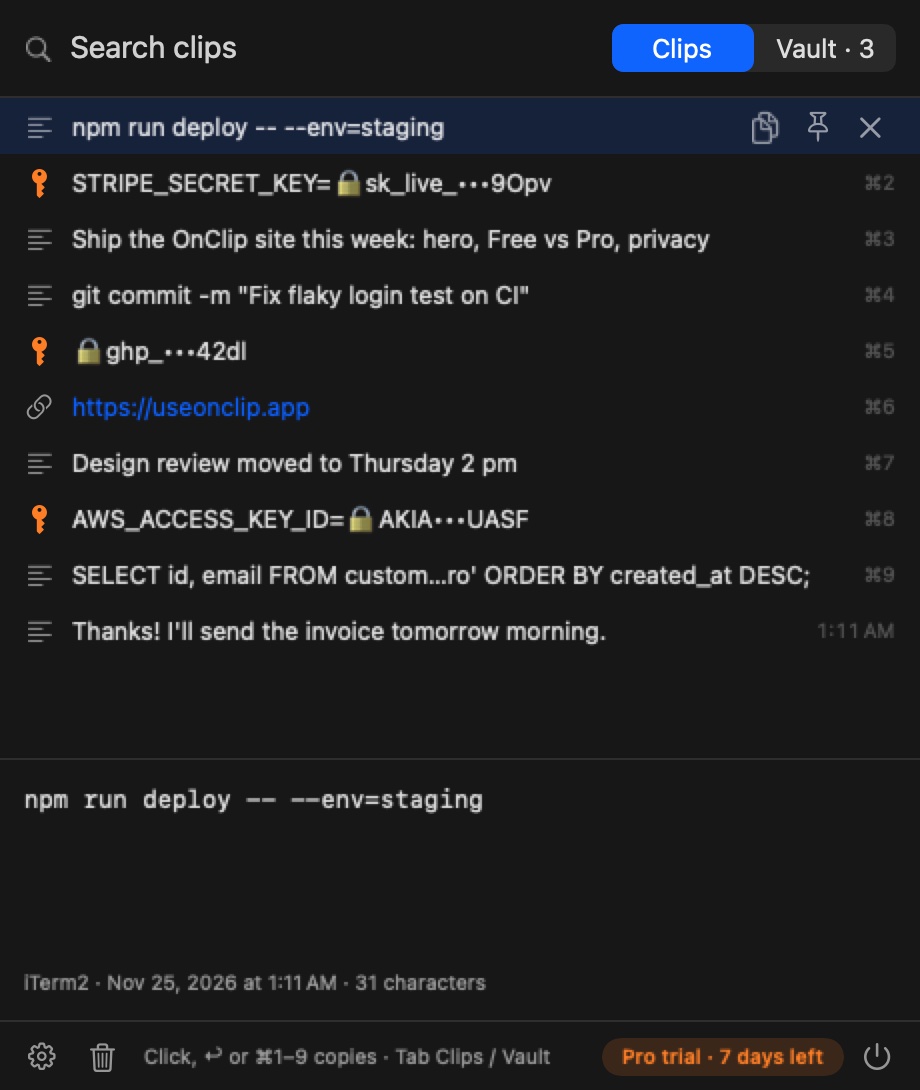
Everything you copy, one keystroke away: ⌃⌘V, search, ⌘1–9.
Catches
Spots API keys, tokens, private keys and passwords the moment you copy them.
Hides
Shows them only as hints like sk_live_•••4f2a, never in plain text, on screen or on disk.
Hands back
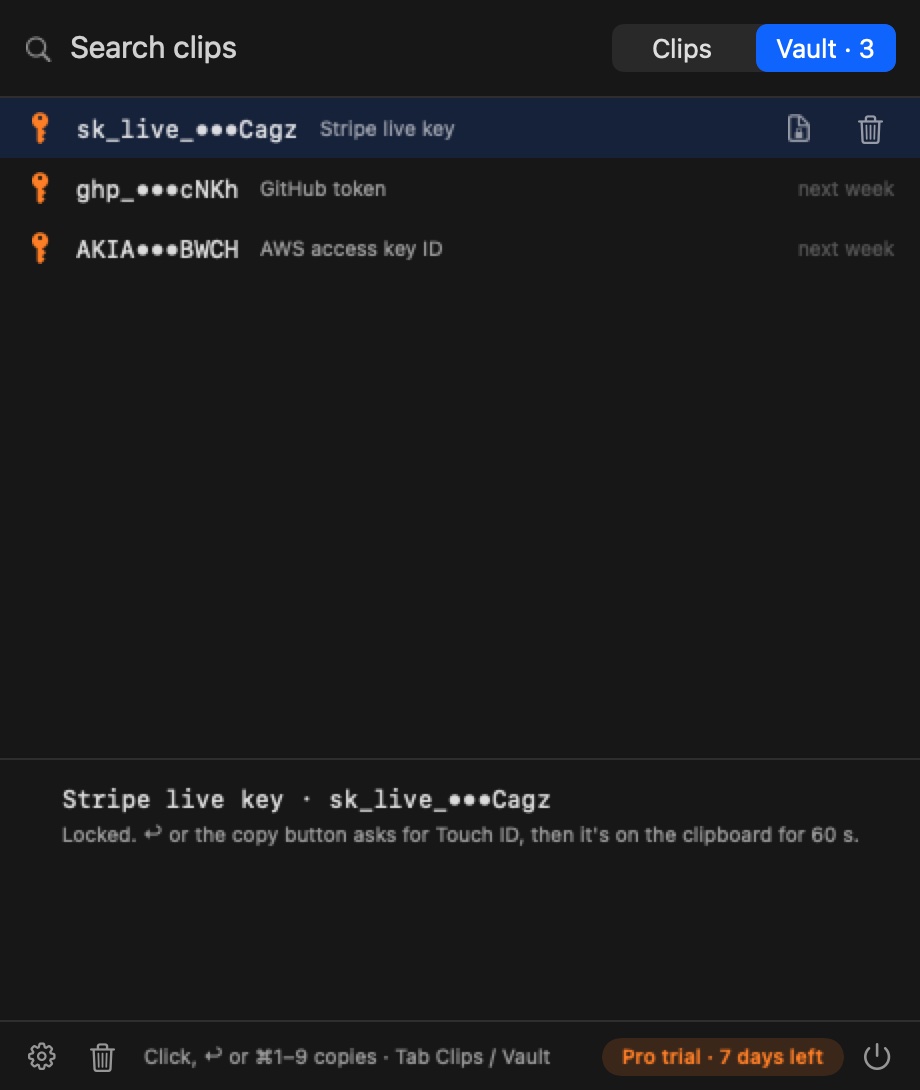
Touch ID, and it's on the clipboard for a minute, then gone.
Why it exists
Your clipboard is where keys leak.
You copy a live key from a dashboard into a terminal, and a typical clipboard manager saves it in plain text for weeks, shows it on screen when you share it, and keeps it on disk. OnClip keeps the whole history, except that secrets live only in an encrypted vault on your Mac, sealed one by one, and come back only with your fingerprint.
- Caught as you copy
- Encrypted on your Mac
- Touch ID to copy back
- Cleared after a minute
- Open detection rules
Pricing
Free for good. Pro once.
Try every Pro feature free for 7 days.
When the trial ends, OnClip keeps working as a free app. Catching and protecting secrets is free for good, and your history, vault and settings are kept. No account, no card.
| What you get | Free$0 | Pro$9.99 once |
|---|---|---|
| Clipboard history, search, pins, ⌃⌘V, ⌘1–9 | ||
| Catches keys, tokens and passwords as you copy | ||
| Secrets shown only as hints; Touch ID to copy back | ||
| Copied secrets cleared from the clipboard | ||
| Never records copies from password managers | ||
| Keep history for | 7 days | 90 days |
| Keep up to | 200 clips | 5,000 clips |
| Keep caught secrets for | 24 hours | 30 days |
| Choose how secrets are shown | ||
| Keep: name, tag and keep secrets for good | Soon | |
| Encrypted backups to iCloud, Google Drive, Dropbox | Soon | |
| Use kept secrets in your code (command line) | Soon |
One-time purchase, no subscription. Secret protection is free on purpose: it's the reason to switch, and it should never be a paywall.
Your clipboard never leaves your Mac. No account, no servers, no analytics, no tracking.
Privacy policy →Support
Questions?
Email support@sage7.ai. We usually reply within one business day.
Email supportOnClip is made by SAGE7 AI LLC, the makers of OnCue.
Common questions
What counts as a secret?
API keys and tokens (Stripe, AWS, GitHub, OpenAI, Anthropic, Slack, Google and more), private keys, JWTs, passwords and values in .env lines, card numbers (checked with Luhn) and IBANs. Detection runs on your Mac, from open rules anyone can read. SSH public keys and certificates are recognised as safe and left alone.
Can I get a secret back after I copied it?
Yes, that's the point. Caught secrets go into an encrypted vault on your Mac. Pick one (in Clips or the Vault tab), confirm with Touch ID or your Mac password, and it's on the clipboard, marked private so other clipboard apps skip it, and cleared again after 60 seconds.
Does it work with 1Password, Bitwarden or Apple Passwords?
Yes. OnClip never records what password managers copy (they mark copies as private, and OnClip also skips them by name). It holds what they don't: the keys and tokens you copy from dashboards, terminals and chats.
Can OnClip see my passwords and send them anywhere?
OnClip has no server and no account. Everything it records is encrypted on your Mac with keys in your Keychain, secrets are never shown or stored as plain text, and nothing is sent anywhere. No analytics either.
What happens when the free trial ends?
OnClip keeps working as a free app: history, search, secret catching, the vault and Touch ID stay free for good. Pro limits (longer history, secrets kept up to 30 days, hint styles) pause until you buy Pro, and nothing is deleted: your settings are kept and come back the moment you unlock. No account or card is needed for the trial.
Direct download or Mac App Store?
Same app. The App Store version is copy-only (Apple's sandbox doesn't allow pasting into other apps); the direct download will add paste-for-you. Pro is an in-app purchase in one and a license key in the other; a purchase in one doesn't unlock the other.